How to Change Your VA Direct Deposit (Online, by Phone or in Person)
Changing banks? Make sure your VA payments follow you. Here's how to update the direct deposit information for your VA disability compensation, pension or education benefits — online, by phone or in person — and what to have ready.
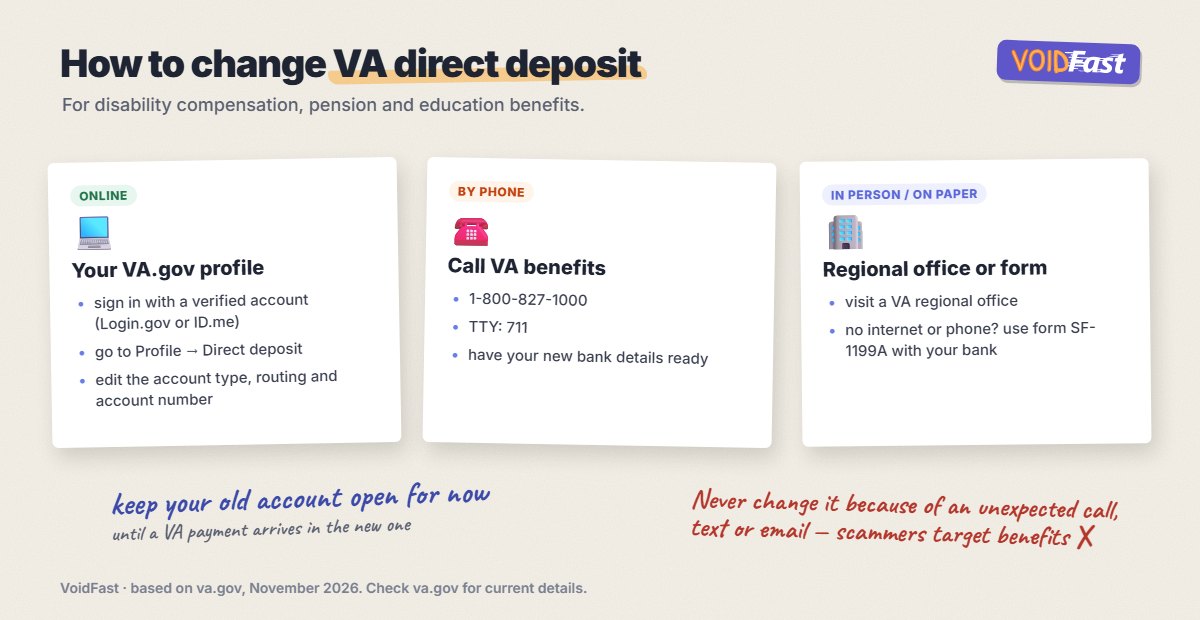
Quick answer: the easiest way is online: sign in to VA.gov with a verified account, go to your profile's direct deposit section, and edit your account type, routing number and account number. You can also call VA at 1-800-827-1000 (TTY 711), visit a VA regional office, or — if you don't have internet or phone access — use Standard Form 1199A.
The steps below are based on VA.gov as of November 2026. Procedures can change, so check va.gov before you start.
Ways to change VA direct deposit
Online on VA.gov
- Sign in to VA.gov. You'll need a verified account — VA uses identity providers such as Login.gov and ID.me.
- Go to your profile and open the direct deposit section.
- Edit the account type (checking or savings), routing number and account number, then save.
VA says changes in your profile apply to disability compensation, pension and education benefits.
By phone
Call VA benefits at 1-800-827-1000 (TTY 711) and have your new bank details ready.
In person or on paper
You can update your direct deposit at a VA regional office. If you don't have internet or phone access, VA also accepts Standard Form 1199A (Direct Deposit Sign-Up Form) — you fill out your part, and your bank completes its section.
What you need
- Your new bank's routing number — 9 digits, in your bank's app or at the bottom of a check. See where is the routing number on a check.
- Your account number.
- The account type — checking or savings. Not sure which you have? See checking vs savings account.
Check every digit before you save — a wrong number can send a payment back and delay it.
Keep your old account open for now
Don't close your old account until you see a VA payment arrive in the new one. If a payment is already on its way to the old account when you make the change, it may still land there.
Watch out for scams
Scammers target veterans' benefits by trying to get them to change their direct deposit details. Never change your bank information because of an unexpected call, text or email — make changes only on VA.gov, through VA's official phone number, or in person.
Changing Social Security or job direct deposit too?
Each payer needs to be updated separately. For Social Security, see how to change your Social Security direct deposit. For a civilian job, your employer will usually ask for a direct deposit form or a voided check. No checkbook for your new account? You can generate a voided check online with VoidFast, for example for U.S. Bank or TD Bank. New to direct deposit? See what is direct deposit.
Frequently asked questions
How do I change my direct deposit with VA?
Online in your VA.gov profile's direct deposit section, by calling 1-800-827-1000, at a VA regional office, or with Standard Form 1199A if you don't have internet or phone access.
Which VA benefits does the online change cover?
According to VA, changes in your VA.gov profile apply to disability compensation, pension and education benefits.
Do I need a verified account to change VA direct deposit online?
Yes. You need to sign in with a verified account, such as Login.gov or ID.me.
What is the phone number to change VA direct deposit?
1-800-827-1000 (TTY 711).
Do I need a voided check to change VA direct deposit?
Not online or by phone — you enter the routing number, account number and account type. With the paper SF-1199A form, your bank completes its section.
Should I close my old bank account right away?
No. Wait until a VA payment arrives in the new account.