How to Change Your Social Security Direct Deposit (Online, by Phone or Through Your Bank)
Switching banks, or opening a new account for your benefits? You need to tell Social Security, or your payment will keep going to the old account. Here are the three ways to change your Social Security direct deposit, what you'll need, how long it takes — and the scam to watch out for.
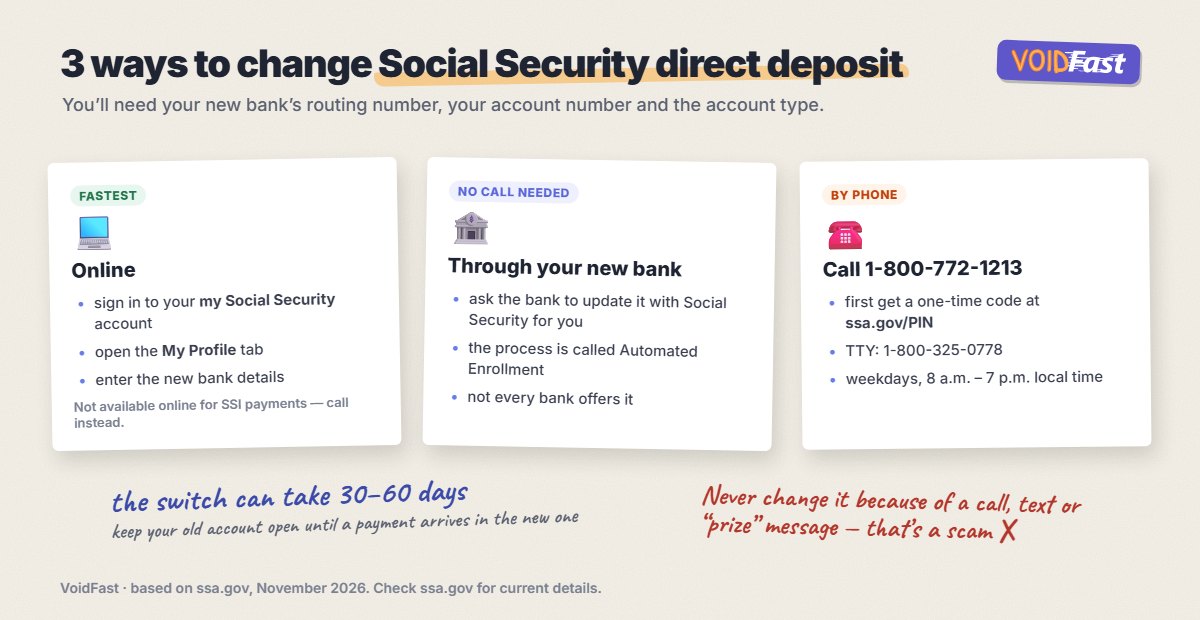
Quick answer: the fastest way is online: sign in to your my Social Security account and update your bank details on the My Profile tab. You can also ask your new bank to send the change to Social Security for you, or call 1-800-772-1213 after getting a one-time code at ssa.gov/PIN. The change can take 30 to 60 days, so keep your old account open until a payment arrives in the new one.
The steps below are based on Social Security's website as of November 2026. Procedures can change, so check ssa.gov before you start.
3 ways to change your direct deposit
1. Online with my Social Security (fastest)
- Sign in to your my Social Security account at ssa.gov. If you don't have one, you can create it for free.
- Open the My Profile tab and choose to update your direct deposit.
- Enter your new bank's routing number, your account number and the account type.
- Choose when the change should take effect, and confirm.
Social Security says this is the fastest way to make the change. It isn't available online for Supplemental Security Income (SSI) payments — if you receive SSI, call instead.
2. Through your new bank
Many banks and credit unions can send your new direct deposit information to Social Security for you, so you don't have to call or go online. Social Security calls this Automated Enrollment. Not every bank offers it, so ask your bank first.
3. By phone
- Before you call, go to ssa.gov/PIN to get a one-time code.
- Call 1-800-772-1213 (TTY 1-800-325-0778), Monday to Friday, 8 a.m. to 7 p.m. local time.
- Give the representative your code and your new bank details.
You don't need an appointment just to change your direct deposit information.
What you need
- Your new bank's routing number — 9 digits. See where is the routing number on a check if you have checks, or look in your bank's app.
- Your account number.
- The account type — checking or savings. Not sure? See checking vs savings account.
- Your Social Security number and the information you use to sign in or verify your identity.
Double-check the numbers before you submit. A single wrong digit can send your payment back and delay it.
How long does it take?
Social Security says a direct deposit change takes about 30 to 60 days. Don't close your old account until you see a benefit payment arrive in the new one — if a payment goes to a closed account, it can take a while to be returned and reissued.
Watch out for direct deposit scams
Scammers pose as Social Security, a bank or a "prize" company and try to get you to change your direct deposit so your benefits go to their account. Never change your direct deposit because of an unexpected call, text, email or prize notice. Make changes only through ssa.gov, the official phone number above, or your own bank.
What about the SF-1199A form?
You may see Standard Form 1199A (the Direct Deposit Sign-Up Form) mentioned online. Social Security accepts it only in specific situations. For most people, the three ways above are the simpler route — ask Social Security or your bank if you've been told to use the form.
Changing direct deposit for a job or other payments
Your Social Security change doesn't update anything else. If you also get a paycheck, a pension or tax refunds by direct deposit, update each payer separately. Employers usually ask for a direct deposit form or a voided check. No checkbook for your new account? You can generate a voided check online with VoidFast — for example for PNC or Truist. New to direct deposit? Start with what is direct deposit.
Frequently asked questions
How do I change my direct deposit for Social Security?
Online in your my Social Security account (My Profile tab), through your new bank if it offers Automated Enrollment, or by calling 1-800-772-1213 after getting a one-time code at ssa.gov/PIN.
Can I change my Social Security direct deposit online?
Yes, in your my Social Security account — except for SSI payments, which have to be changed by phone.
How long does it take to change direct deposit for Social Security?
About 30 to 60 days, according to Social Security. Keep your old account open until a payment arrives in the new one.
What is the phone number to change Social Security direct deposit?
1-800-772-1213 (TTY 1-800-325-0778). Get a one-time code at ssa.gov/PIN before you call.
Do I need a voided check to change Social Security direct deposit?
No. You need your new routing number, account number and account type. An employer may still ask you for a voided check for your paycheck.
Can my bank change my Social Security direct deposit?
Many banks can, through Social Security's Automated Enrollment process. Ask your bank whether it offers it.